Tuesday, 10 September 2013

VOLATILE MEMORY : RAM

•RAM chips usually reside on a memory module and are inserted into memory slot

•The amount of RAM necessary in a computer often depends on the types of software you plan to use

THREE BASIC TYPES OF RAM
DYNAMIC RAM (DRAM
Chips must be re-energized constantly or they lose their contents.

STATIC RAM (SRAM)
Chips are faster and more reliable than any
variation of DRAM chips.
Are much more expensive than DRAM chips.

MAGNETORESISTIVE RAM (MRAM)
A newer type of RAM, called magnetoresistive
RAM (MRAM pronounced EM-ram), stores data using
magnetic charges instead of electrical charges

Tuesday, 3 September 2013

MEMORY

   Memory consists of electronic components that store instructions waiting to be executed by the processor, data needed by those instructions, and the results of processing the data

Memory size is measured in kilobytes (KB or K),
megabytes (MB), gigabytes (GB), or terabytes (TB)

TYPES OF MEMORY
> Volatile
> Nonvolatile

   VOLATILE MEMORY
When the computer’s power is turned off, volatile memory loses its contents.
Volatile memory is temporary.
RAM is the most common type of volatile memory

NONVOLATILE MEMORY
    Nonvolatile memory does not lose its  contents when power is removed from the  computer.
Nonvolatile memory is permanent.
Examples of nonvolatile memory include ROM.

    Differences between volatile and non-volatile
    VOLATILE MEMORY
1) Loses its contents when power is turned       off (store data for temporary time only)

2) Can be read from and written to by the           processor and other devices.

3) Hold data or programs that are currently       being used by the processor
                         
4) RAM chip are assembled on a small             circuit board called memory module which     is plugged onto the memory slots.

NONVOLATILE MEMORY

  1)Does not lose contents when power is removed(store data permanently)

  2)Data is prerecorded for read only and cannot be modified or removed

  3)Contain a small startup program          (BIOS) which is used to boot the          computer 

 4)Exists as a chip on the motherboard


Tuesday, 27 August 2013

COMPUTER HARDWARE

COMPONENTS IN COMPUTER HARDWARE


  1. PROCESSOR
  2. MOTHERBOARD
  3. MEMORY
  4. ADAPTER CARD
  5. INPUT DEVICES
  6. OUTPUT DEVICES

PROCESSOR...


 -Processor  is an electronic component which process a lot of operations and instruction from users.
-Consist of 2 components which are Arithmetic Logic Unit (ALU) and Control Unit (CU).
-CU carries out all basic instructions while ALU interprets and performs logical instructions which  include arithmetic operations
-CU and ALU work together in machine cycle:
  • FETCH- Process  of obtaining a program instruction or data from memory.
  • DECODE- Process of translating the instruction into signals the computer can execute.
  • EXECUTE- Process of carrying out the commands.
  • STORE- Writing result to memory.

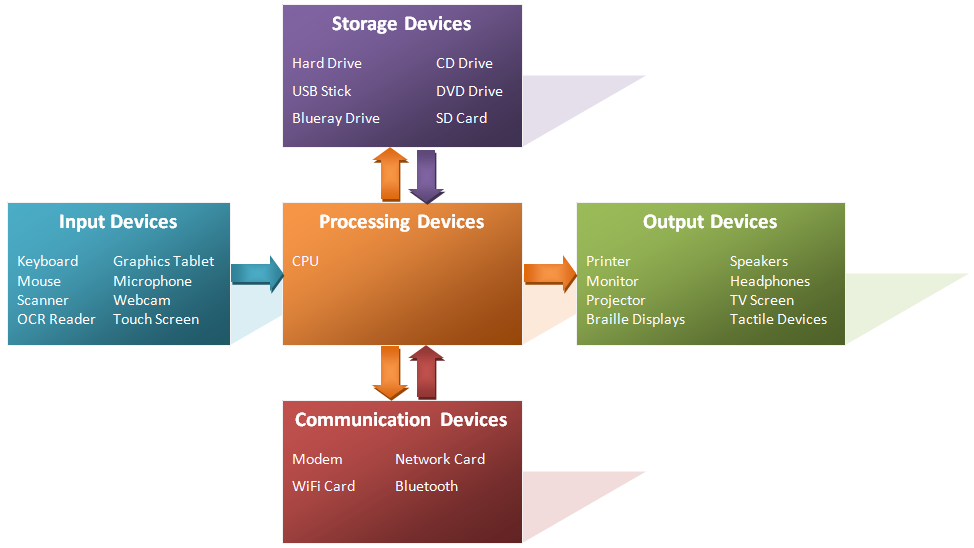
INFORMATION PROCESSING CYCLE


Input


•Any data and instruction entered into memory of computer.

Output

•Data that has been processed into a useful form.

Process

•Transform an input data flow into an output data flow.

Storage

•Hold data instructions and information for future use.

INTRODUCTION TO COMPUTER SYSTEM

A computer system is a computer function that consist of operating system,software and hardware.
Components of a computer system :
i) HARDWARE
  • Input devices
  • CPU
  • Output devices
  • Storage devices

ii)SOFTWARE
  • System software
  • Application software

ABOUT US

TRIPLE AAA.

Welcome to our blog and welcome to some real online reading material!
We publish to you the detailed specs of what a computer system is. 
Just before we go any further,let's have a little intro on the minds behind this technical blogsite :

The first A, Mr. Mohamad Asyraf Bin Mohd Nasir.
Born in the streets of Kuala Lumpur but raised up in Petaling Jaya,Selangor. 
KMPk Gopeng,Perak batch 2013/2014. Modul II.
Future engineer,current enthusiast. Working alongside me are two other delightful ladies ;


The next A, Ms. Che Asmawani Binti Che Anuar.
KMPk AWESOME PERGHHH!! From Kelantan Darul Naim. Conversion student from module 3 to module 2.. 


The third A to our proudly formed group,is Norasmiza Binti Mohd.
lives in Jengka Pahang..currently study in Perak Matriculation College...PST module 2 student...